Expense tracking for rental property owners

Rental property expense tracking that stays tied to the right property

Most rental operators lose track of expenses the same way: the receipt goes into a phone photo, the vendor gets paid, and three months later nobody can remember which property the repair was for. Keylio keeps every expense tied to the property it belongs to, backed by the receipt that supports it, and categorized consistently so your accountant gets a clean ledger instead of a shoebox. The same workflow covers Airbnb rentals, long-term leases, and mixed portfolios.

Why rental expense tracking usually breaks down

Operators rarely lose money because they forgot a major bill. They lose visibility because small operational costs end up scattered across email threads, card statements, phone photos, and spreadsheets that never stay tied to the right property.

  • A typical month might include a cleaning company invoice for one property, a supply run receipt covering two properties, a contractor payment that needs to be split across expense categories, and a handful of purchases from a card that also covers personal spending. None of those are complicated individually. All of them become time-consuming if they are not captured in context when they happen.
  • Short-term and long-term rentals often end up tracked in separate systems or separate spreadsheet tabs, which makes monthly review and tax prep slower than it needs to be.
  • When expenses are not linked to receipts or a consistent category system, accountants receive incomplete records and owners spend hours reconstructing context that should already exist.
  • Generic bookkeeping tools like QuickBooks can capture totals, but they do not preserve the property-level context that explains where each cost came from or which rental it supports.

How Keylio handles rental expense tracking

Keylio keeps expenses in a property-aware ledger instead of a generic list. Each record stores the property, category, amount, date, payment method, and attached receipt so the record stays usable long after the transaction happened - and your accountant does not have to ask follow-up questions.

Step 1

Log expenses against the right property from the start

Create expense entries manually or from an uploaded receipt and keep every line item tied to the correct property instead of a catch-all spreadsheet tab. STR and long-term rental expenses live in the same system without requiring separate workflows.
Step 2

Use categories that reflect real rental bookkeeping

Keylio supports a per-user master category list with property-level filtering, so you can keep categories consistent across the account - repairs, cleaning, supplies, utilities, insurance, management fees - while limiting each property to the categories that actually apply.

Step 3

Review and export records without rebuilding context

Sort, filter, group, bulk edit, and export expenses with their categories, payment methods, dates, and receipt attachments already in place. Your accountant gets a structured record, not a folder of unsorted files.

Portfolio performance, revenue, and expenses in one view

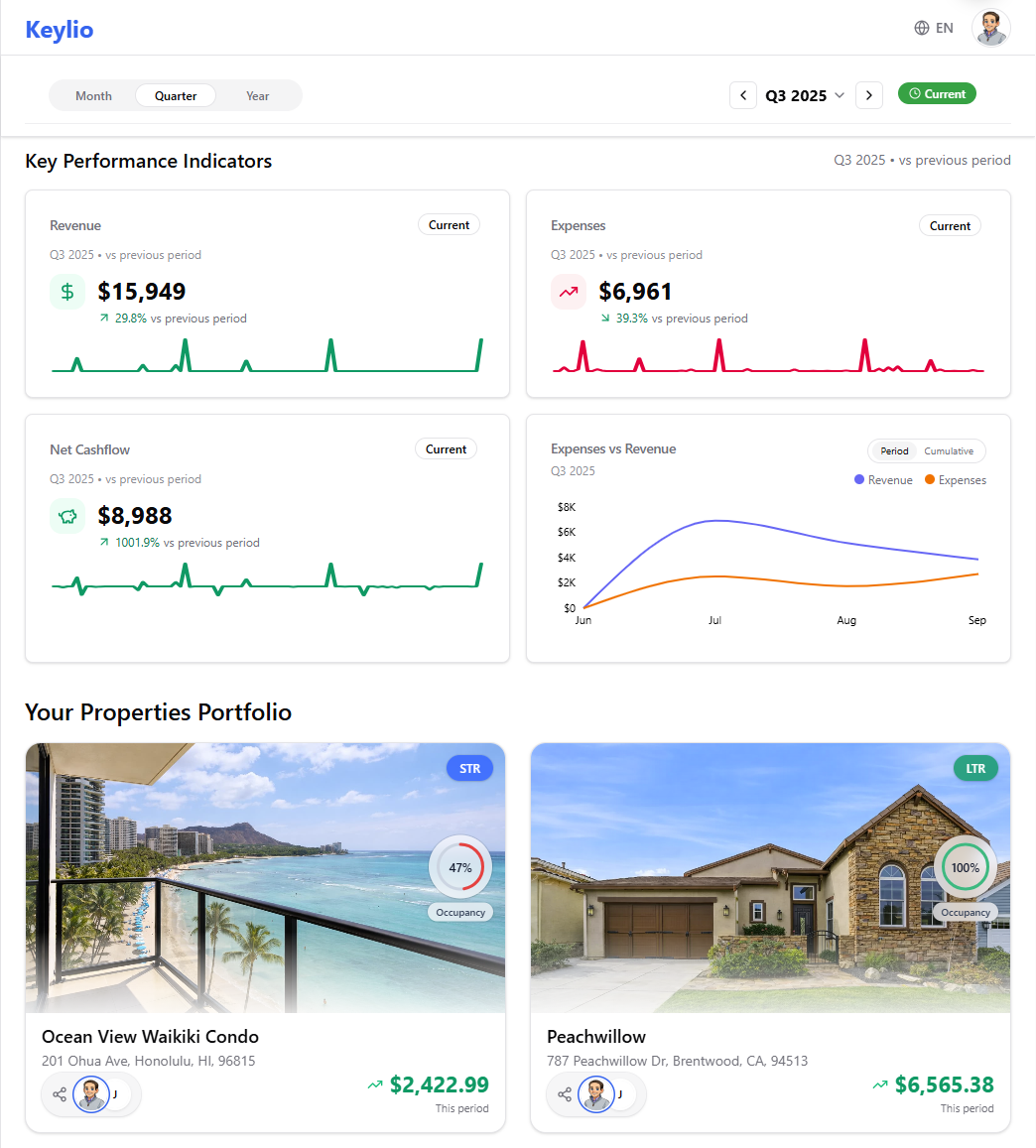
Keylio keeps expense tracking inside the same system as portfolio revenue and property performance, so you can review costs in context without reconciling separate dashboards.

Keylio dashboard showing revenue, expenses, net cashflow, and property portfolio cards.
Real Keylio dashboard screenshot showing revenue, expenses, and portfolio-level visibility in one view.

Rental expense tracking FAQ

Can I track expenses separately for each rental property?

Yes. Every expense in Keylio is stored with a property relationship, so each entry stays tied to the correct rental instead of disappearing into a shared ledger with no context. If you have three properties, you can filter expenses to any one of them at any time.

Does Keylio work for both Airbnb expense tracking and long-term rental bookkeeping?

Yes. The same expense workflow covers short-term rental operations, long-term leases, and mixed portfolios. You do not need a separate system for each property type, and expenses for both types appear in the same export your accountant will use.

Is Keylio better than a spreadsheet for tracking rental expenses?

For small portfolios, a well-maintained spreadsheet can work - until it does not. The breakdown usually happens when you have multiple properties, multiple receipts arriving in different formats, or an accountant asking questions about entries from six months ago. Keylio keeps the receipt, the property, the category, and the date attached to every expense record so that context does not have to be reconstructed later.

Can I attach receipts to expenses in Keylio?

Yes. Receipts can be uploaded first and linked to an expense later, or an expense can be created first and have a receipt attached afterward. Either way, the receipt stays connected to the expense record rather than living in a separate folder.

How does Keylio help with Schedule E tax reporting?

Keylio is designed to keep expenses categorized and receipts attached year-round so that when your accountant prepares Schedule E, the records are already structured. Categories map to standard rental expense deduction types including repairs, management fees, utilities, insurance, and supplies.

Can I export rental expenses for my accountant?

Yes. Keylio supports expense exports with property, category, date, amount, and payment method included so your accountant receives a usable record instead of a list of raw numbers.

Related feature pages

Keylio works best when expenses, receipts, booking revenue, and documents live in the same operating system. Use these related pages to see the adjacent workflow.

Receipt scanning

Receipts from cleaners, contractors, supply runs, and utility top-ups arrive in formats that make record-keeping easy to defer and hard to reconstruct. Keylio lets you upload a receipt against a property, extract the key fields with AI-assisted processing, and connect it to an expense record - so the documentation is in place before you forget which property the repair was for.

Receipt scanning

Booking revenue sync

An Airbnb payout does not arrive labeled by booking. It arrives as a lump transfer that covers multiple stays, nets out platform fees, and hits your bank account two days after the last checkout. Keylio lets you record what was earned, when cash arrived, which platform it came from, and which booking generated it - so the number in your ledger has context instead of just being a transfer reference.

Booking revenue sync

Stop rebuilding expense records at year-end

Start capturing rental expenses in Keylio and give your accountant a clean, property-level ledger backed by receipts - before tax season turns into a recovery project. Free to start, no credit card required.